CSDMS models
The CSDMS Model Repository holds over 400 open-source-licensed models and tools, spanning a range of disciplines under the broad category of Earth and planetary surface processes. These models and tools are written in a variety of languages, including C, C++, Fortran, and Python. Some are wrapped with a Basic Model Interface (BMI).
Below, we describe writing grpc4bmi servers for two BMI-wrapped models selected from the CSDMS Model Repository and running them through the grpc4bmi Python client.
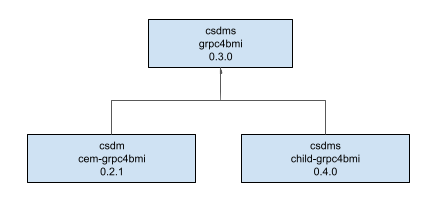
Figure 4 : Inheritance diagram for grpc4bmi server images of two BMI-wrapped models from the CSDMS Model Repository.
Coastline Evolution Model
The Coastline Evolution Model (CEM) is a one-dimensional model of coastline evolution that simulates the long-term evolution of a sandy coastline under the influence of waves, tides, and sediment transport.
From the root directory of the source repository, the file structure of the grpc4bmi server for CEM is:
cem-grpc4bmi
├── Dockerfile
└── server
    ├── cem-grpc4bmi-server.cxx
    └── CMakeLists.txt
Note that while CEM is written in C, the server is actually a C++ project to match the grpc4bmi software and its dependencies.
The server source, cem-grpc4bmi-server.cxx, includes:
the CEM BMI header,
bmi_cem.h, and the grpc4bmi server header,bmi_grpc_server.ha main program that instantiates the model’s BMI and calls the grpc4bmi run_bmi_server function, passing in the model’s BMI instance
The build system is CMake.
In the Docker image build, CEM is built from source and installed into the image at CONDA_DIR=/opt/conda.
The server is compiled into the executable cem-grpc4bmi-server and installed alongside CEM in CONDA_DIR.
The server executable is the entry point into the container, exposed through port 55555.
On the host machine, Docker and the grpc4bmi client must be installed.
To use the client, import the BmiClientDocker class into a Python session and use it to create an instance of the model, as shown in the simple example below.
from grpc4bmi.bmi_client_docker import BmiClientDocker


m = BmiClientDocker(image="csdms/cem-grpc4bmi", image_port=55555, work_dir=".")
m.get_component_name()

del m  # stop the container cleanly
Note that the image parameter refers to a built version of the image; using "csdms/cem-grpc4bmi" pulls the latest version of the image from Docker Hub.
All BMI methods can now be called to query and run the model.
For more in-depth examples of running CEM through grpc4bmi, including a Python script and a Jupyter notebook, see the examples directory of the source repository.
CEM grpc4bmi server image
Source repository: https://github.com/csdms/cem-grpc4bmi
Image repository: https://hub.docker.com/r/csdms/cem-grpc4bmi
Channel-Hillslope Integrated Landscape Development model
The Channel-Hillslope Integrated Landscape Development (CHILD) model computes the time evolution of a topographic surface by fluvial and hillslope erosion and sediment transport.
From the root directory of the source repository, the file structure of the grpc4bmi server for CHILD is:
child-grpc4bmi
├── Dockerfile
└── server
    ├── child-grpc4bmi-server.cxx
    └── CMakeLists.txt
The server source, child-grpc4bmi-server.cxx, includes:
the CHILD BMI header,
bmi_child.hxx, and the grpc4bmi server header,bmi_grpc_server.ha main program that instantiates the model’s BMI and calls the grpc4bmi run_bmi_server function, passing in the model’s BMI instance
The build system is CMake.
In the Docker image build, CHILD is built from source and installed into the image at CONDA_DIR=/opt/conda.
The server is compiled into the executable child-grpc4bmi-server and installed alongside CHILD in CONDA_DIR.
The server executable is the entry point into the container, exposed through port 55555.
On the host machine, Docker and the grpc4bmi client must be installed.
To use the client, import the BmiClientDocker class into a Python session and use it to create an instance of the model, as shown in the simple example below.
from grpc4bmi.bmi_client_docker import BmiClientDocker


m = BmiClientDocker(image="csdms/child-grpc4bmi", image_port=55555, work_dir=".")
m.get_component_name()

del m  # stop the container cleanly
Note that the image parameter refers to a built version of the image; using "csdms/child-grpc4bmi" pulls the latest version of the image from Docker Hub.
All BMI methods can now be called to query and run the model.
For more in-depth examples of running CHILD through grpc4bmi, including a Python script and a Jupyter notebook, see the examples directory of the source repository.
CHILD grpc4bmi server image
Source repository: https://github.com/csdms/child-grpc4bmi
Image repository: https://hub.docker.com/r/csdms/child-grpc4bmi