BMI example models
CSDMS maintains a set of example models (nominally of temperature diffusion; each is named Heat), listed in Table 1, that are written in C, C++, Fortran, and Python and wrapped with a Basic Model Interface (BMI). They are included in the BMI base image, which is the base for the grpc4bmi base image, which, as shown in Figure 3, is the base for the grpc4bmi servers for these examples.
Below, we describe writing the grpc4bmi servers for these models and running them through the grpc4bmi Python client.
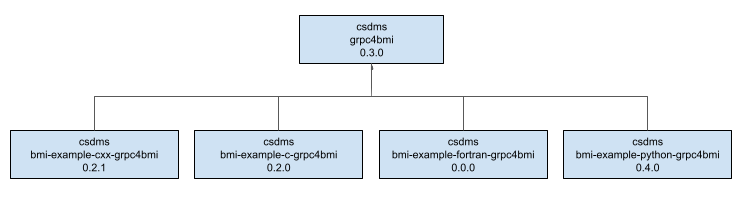
Figure 3 : Inheritance diagram for the BMI example model grpc4bmi server images.
Note
In the examples below, the source repository contains two options for building a grpc4bmi server: one titled conda-base, the other source-base. Here, we’ll use the conda-base option. It uses the grpc4bmi base image described in the Base images section, where conda-forge is used to satisfy all dependencies. The source-base option is an alternative where all grpc4bmi dependencies are built from source, which can be tricky.
C example
From the root directory of the source repository, the file structure of the grpc4bmi server for the C Heat model is:
images/conda-base
├── Dockerfile
├── README.md
└── server
    ├── CMakeLists.txt
    └── heatc-grpc4bmi-server.cxx
Note that the server is actually a C++ project to match the grpc4bmi software and its dependencies.
The server source, heatc-grpc4bmi-server.cxx, includes:
the Heat model header,
bmi_heat.h, and the grpc4bmi server header,bmi_grpc_server.ha main program that instantiates the model’s BMI and calls the grpc4bmi run_bmi_server function, passing in the model’s BMI instance
The build system is CMake.
In Docker, the server is compiled into the executable heatc-grpc4bmi-server and installed alongside the existing Heat model into CONDA_DIR=/opt/conda.
The server executable is the entry point into the container, exposed through port 55555.
On the host machine, Docker and the grpc4bmi client must be installed.
To use the client, import the BmiClientDocker class into a Python session and use it to create an instance of the model, as shown in the simple example below.
from grpc4bmi.bmi_client_docker import BmiClientDocker


m = BmiClientDocker(image="csdms/bmi-example-c-grpc4bmi", image_port=55555, work_dir=".")
m.get_component_name()

del m  # stop the container cleanly
Note that the image parameter refers to a built version of the image; using "csdms/bmi-example-c-grpc4bmi" pulls the latest version of the image from Docker Hub.
All BMI methods can now be called to query and run the model.
For more in-depth examples of running the Heat model through grpc4bmi, including a Python script and a Jupyter notebook, see the examples directory of the source repository.
BMI C example grpc4bmi server image
Source repository: https://github.com/csdms/bmi-example-c-grpc4bmi (includes build instructions)
Image repository: https://hub.docker.com/r/csdms/bmi-example-c-grpc4bmi
C++ example
From the root directory of the source repository, the file structure of the grpc4bmi server for the C++ Heat model is:
images/conda-base
├── Dockerfile
├── README.md
└── server
    ├── CMakeLists.txt
    └── heatcxx-grpc4bmi-server.cxx
The server source, heatcxx-grpc4bmi-server.cxx, includes:
the Heat model header,
bmi_heat.hxx, and the grpc4bmi server header,bmi_grpc_server.ha main program that instantiates the model’s BMI and calls the grpc4bmi run_bmi_server function, passing in the model’s BMI instance
The build system is CMake.
In Docker, the server is compiled into the executable heatcxx-grpc4bmi-server and installed alongside the existing Heat model into CONDA_DIR=/opt/conda.
The server executable is the entry point into the container, exposed through port 55555.
On the host machine, Docker and the grpc4bmi client must be installed.
To use the client, import the BmiClientDocker class into a Python session and use it to create an instance of the model, as shown in the simple example below.
from grpc4bmi.bmi_client_docker import BmiClientDocker


m = BmiClientDocker(image="csdms/bmi-example-cxx-grpc4bmi", image_port=55555, work_dir=".")
m.get_component_name()

del m  # stop the container cleanly
Note that the image parameter refers to a built version of the image; using "csdms/bmi-example-cxx-grpc4bmi" pulls the latest version of the image from Docker Hub.
All BMI methods can now be called to query and run the model.
For more in-depth examples of running the Heat model through grpc4bmi, including a Python script and a Jupyter notebook, see the examples directory of the source repository.
BMI C++ example grpc4bmi server image
Source repository: https://github.com/csdms/bmi-example-cxx-grpc4bmi (includes build instructions)
Image repository: https://hub.docker.com/r/csdms/bmi-example-cxx-grpc4bmi
Fortran example
Warning
This example is still under development.
BMI Fortran example grpc4bmi server image
Source repository: https://github.com/csdms/bmi-example-fortran-grpc4bmi
Python example
The grpc4bmi server for a Python model is much easier to create than the other languages above. All that is required is a Dockerfile. Build a Docker image, installing the grpc4bmi Python server with pip, and letting run-bmi-server provide the entrypoint, passing in an instance of the model’s BMI. See the source repository for build instructions.
On the host machine, Docker and the grpc4bmi client must be installed.
To use the client, import the BmiClientDocker class into a Python session and use it to create an instance of the model, as shown in the simple example below.
from grpc4bmi.bmi_client_docker import BmiClientDocker


m = BmiClientDocker(image="csdms/bmi-example-python-grpc4bmi", image_port=55555, work_dir=".")
m.get_component_name()

del m  # stop the container cleanly
Note that the image parameter refers to a built version of the image; using "csdms/bmi-example-python-grpc4bmi" pulls the latest version of the image from Docker Hub.
All BMI methods can now be called to query and run the model.
For more in-depth examples of running the Heat model through grpc4bmi, including a Python script and a Jupyter notebook, see the examples directory of the source repository.
BMI Python example grpc4bmi server image
Source repository: https://github.com/csdms/bmi-example-python-grpc4bmi
Image repository: https://hub.docker.com/r/csdms/bmi-example-python-grpc4bmi